Here's my Learning Diary of the 'Learning with Creativity:Let the game begin!'MOOC by the European Schoolnet Academy
Showing posts with label PD. Show all posts
Showing posts with label PD. Show all posts
Tuesday, 30 April 2019

Sunday, 13 May 2018
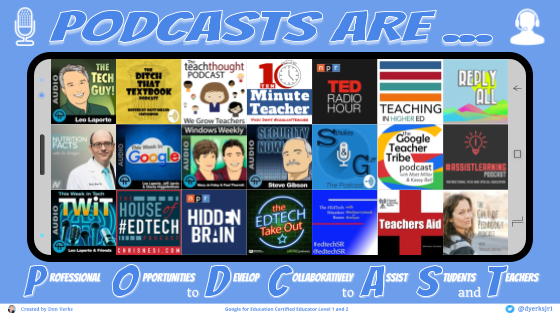
Professional Development through Podcasts curated in Google Drawings
One of my most favorite persons in my PLN is Don Yerks. He is a Google Certified Educator (level 1&2), a lifelong learner and an awesome person! I got to know him through Tony Vincent's online classes (Classy Videos and Classy Graphics). I always enjoyed the perfect assignments he submitted for the classes. I was also fond of the constructive and encouraging feedback he provided to his 'classmates'.
I've recently stumbled upon one of Don's twitter posts and was really amazed at his new creation using Google Drawings. I adored his fantastic work for many reasons. First of all, its content was something I was immediately attracted to. I always try to find ways for engaging in free Professional Development. The podcasts Don suggests on his image are worth listening to for any educator! Second, I loved the combination of colors, the clever design with the mobile screen, the fonts and the text drop shadow use. And ... I should not leave out the most important reason I liked Don's Google Drawing so much; it is interactive! This is so amazing! You can access each podcast he suggests by clicking on the relevant small image. Try it out HERE!
I am so grateful to Don Yerks for allowing me to share his awesome work on my blog! Thanks Don!
I've recently stumbled upon one of Don's twitter posts and was really amazed at his new creation using Google Drawings. I adored his fantastic work for many reasons. First of all, its content was something I was immediately attracted to. I always try to find ways for engaging in free Professional Development. The podcasts Don suggests on his image are worth listening to for any educator! Second, I loved the combination of colors, the clever design with the mobile screen, the fonts and the text drop shadow use. And ... I should not leave out the most important reason I liked Don's Google Drawing so much; it is interactive! This is so amazing! You can access each podcast he suggests by clicking on the relevant small image. Try it out HERE!
I am so grateful to Don Yerks for allowing me to share his awesome work on my blog! Thanks Don!
Saturday, 25 February 2017
ListeningEVO17
Having been a participant in the ListeningEVO course, I feel the desire to express my deepest gratitude to all the organizers and especially to our moderator, Ms Olya Sergeeva. All the input material we were exposed to was highly interesting and enormously useful for a listening teacher. The course lasted five weeks, from January 8 to February 12, 2017. Below I'm recording some of the takeaways from my participation in this MOOC based either on new knowledge or high interest of content to me.
To start with, reinforcing autonomous listening through an out-of-school listening scheme was stressed during our first week of the course. Technology integration can obviously facilitate this scheme. Some stimulating suggestions for learners include listening to radio stations (e.g. http://www.listenlive.eu/uk.html, podcasts (e.g. https://independentenglish.wordpress.com/2012/02/14/podcasts/, favourite songs (e.g. https://lyricstraining.com/), audiobooks (e.g. http://www.loyalbooks.com/), youtube videos, web tools with audio features (e.g. https://quizlet.com/) and many more online resources curated by the course participants on a shared google spreadsheet (https://goo.gl/FQZbYz).
Something additional that particularly struck me during week1 was the shadowing technique as a useful approach to encourage autonomous listening and speaking practice. Shadowing requires EFL learners to listen to a short audio text many times. The short audio text should be saved on each learner’s device so that they can listen to it outside class as regularly as possible; an accompanying transcript should also be provided to the students. The practice stage of this technique encourages students to repeat and copy, as precisely as possible, the speaker’s pronunciation, rhythm, pace and other speech features. As a subsequent step, the students record themselves on an audio recording tool such as Audacity when they feel they sound similar to the speaker on their audio text.
In week 2 I enjoyed Elena Wilkinson's neat presentation on the structure of a traditional listening lesson which can be enhanced through the use of authentic materials and real-life tasks. Here are my notes on E. Wilkinson's live session.
ListeningEVO, wk2 by anthiharou
ListeningEVO, wk2 by anthiharou
Week 3 focused on the importance of 21st-century skills, critical thinking and HOTS (higher order thinking tasks) in the design of listening tasks to engage learners.
Weeks 4 and 5 proved to be a gem for me as I acquired valuable knowledge shared by outstanding experts on the topic such as R. Cauldwell, S. Thorn, and O. Sergeeva. Listening is quite troublesome for ELLs because words have a variety of soundshapes and are not visible as they are in reading. Therefore, we need to prepare learners to cope with the jungle-type situations of messy speech they will face in real life. Exposing learners to authentic listening texts with a variety of unruly sounds, and providing them with decoding tasks to train them to recognize individual words are means which enable ELLs to reach the ultimate goal which is meaning. Gap-fills and dictations can be effective activities in raising learners' awareness of phonological and other speech features such as word or sentence stress, elision, glottal stop, schwa, assimilation, intrusive sounds in a stream of authentic speech.
Weeks 4 and 5 proved to be a gem for me as I acquired valuable knowledge shared by outstanding experts on the topic such as R. Cauldwell, S. Thorn, and O. Sergeeva. Listening is quite troublesome for ELLs because words have a variety of soundshapes and are not visible as they are in reading. Therefore, we need to prepare learners to cope with the jungle-type situations of messy speech they will face in real life. Exposing learners to authentic listening texts with a variety of unruly sounds, and providing them with decoding tasks to train them to recognize individual words are means which enable ELLs to reach the ultimate goal which is meaning. Gap-fills and dictations can be effective activities in raising learners' awareness of phonological and other speech features such as word or sentence stress, elision, glottal stop, schwa, assimilation, intrusive sounds in a stream of authentic speech.
To conclude, I enjoyed an amazing course on how to teach listening. I liked the well-organized structure of the MOOC, the wealth of interesting input materials such as videos, articles, lesson plans and presentations, my interaction with other participants, the badges I earned, Ms O. Sergeeva's enthusiasm and encouragement as a moderator, the facebook page, the twitter posts and, of course, the new knowledge I acquired.
Written by Anthippi Harou
Wednesday, 16 November 2016
Google Earth and Google My Maps (Etwinning Learning Event)
I enjoyed my participation in Google Earth Etwinning Learning Event (Nov., 2016) moderated by Marco Neves . We mainly focused on Google Earth and Google Mymaps.
Both Google Earth and Google My Maps are powerful educational tools in the way knowledge is conveyed. They provide students with an unforgettable virtual experience of any subject area they may deal with. The 3-D feature, the visuals and the sound engage and motivate students to deepen their knowledge and further understand a topic. Google Earth, Google my Maps and similar mapping tools also trigger students' exploration skills and promote inquiry-based learning.
Especially, in an etwinning project participants can have a better idea of where their partner school is located and explore their area in detail. Knowing their partners better grows bonds between countries and increases their interactivity and collaboration necessary for an etwinning project. Finally, these tools can facilitate a variety of tasks in an etwinning project. For example, students can share information on their towns or villages, landmarks, museums, favourite places in their country, and so on.
Here’s a list of the RESOURCES we were provided with in the learning event and some sites I gathered.
Share your Google Earth Tour to youtube via Movie MakerGoogle My Maps Track
Subscribe to:
Posts (Atom)